10. 练习:在 sklearn 中进行测试

使用 sklearn 可以轻松地将数据集拆分为训练数据和测试数据。我们只需输入 train_test_split 命令。该函数获得输入 X y ,然后返回四项内容:

  • X_train :训练输入数据
  • X_test :测试输入数据
  • y_train :训练标签
  • y_test :测试标签

该函数的调用如下所示:

from sklearn.model_selection import train_test_split
X_train, X_test, y_train, y_test = train_test_split(X, y, test_size = 0.25)

最后一个参数 test_size 是我们想用作测试数据的点所占百分比。在上述调用中,我们使用 25% 的数据作为测试数据,75% 作为训练数据。

我们练习下!我们将再次使用上一部分的数据集:
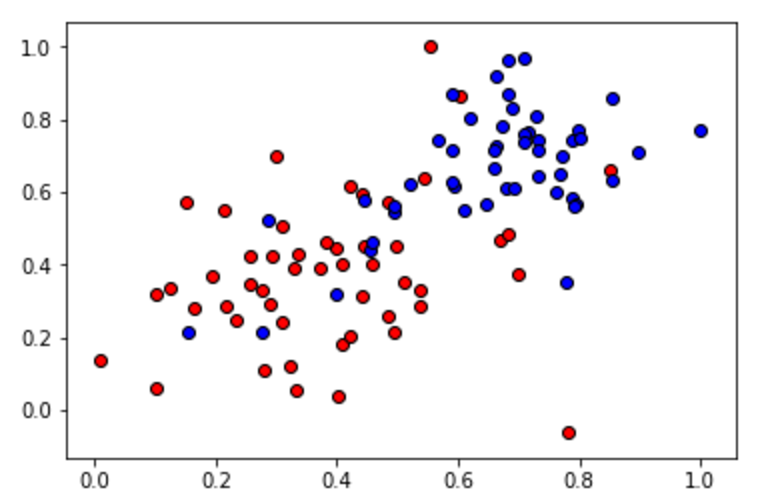
在下面的测验中,使用 train_test_split 函数将数据集拆分为训练集和测试集。测试集的大小必须是数据总大小的 20% 。训练集称为 X_train y_train ,测试集称为 X_test y_test

点击 测试答案 看看结果的可视化效果,训练集将画为圆圈,测试集将画为方形。完成后,点击 提交答案 以便我们评估你的代码!

Start Quiz:

# Reading the csv file
import pandas as pd
data = pd.read_csv("data.csv")

# Splitting the data into X and y
import numpy as np
X = np.array(data[['x1', 'x2']])
y = np.array(data['y'])

# Import statement for train_test_split
from sklearn.cross_validation import train_test_split

# TODO: Use the train_test_split function to split the data into
# training and testing sets.
# The size of the testing set should be 20% of the total size of the data.
# Your output should contain 4 objects.
x1,x2,y
0.78051,-0.063669,0
0.28774,0.29139,0
0.40714,0.17878,0
0.2923,0.4217,0
0.50922,0.35256,0
0.27785,0.10802,0
0.27527,0.33223,0
0.43999,0.31245,0
0.33557,0.42984,0
0.23448,0.24986,0
0.0084492,0.13658,0
0.12419,0.33595,0
0.25644,0.42624,0
0.4591,0.40426,0
0.44547,0.45117,0
0.42218,0.20118,0
0.49563,0.21445,0
0.30848,0.24306,0
0.39707,0.44438,0
0.32945,0.39217,0
0.40739,0.40271,0
0.3106,0.50702,0
0.49638,0.45384,0
0.10073,0.32053,0
0.69907,0.37307,0
0.29767,0.69648,0
0.15099,0.57341,0
0.16427,0.27759,0
0.33259,0.055964,0
0.53741,0.28637,0
0.19503,0.36879,0
0.40278,0.035148,0
0.21296,0.55169,0
0.48447,0.56991,0
0.25476,0.34596,0
0.21726,0.28641,0
0.67078,0.46538,0
0.3815,0.4622,0
0.53838,0.32774,0
0.4849,0.26071,0
0.37095,0.38809,0
0.54527,0.63911,0
0.32149,0.12007,0
0.42216,0.61666,0
0.10194,0.060408,0
0.15254,0.2168,1
0.45558,0.43769,1
0.28488,0.52142,1
0.27633,0.21264,1
0.39748,0.31902,1
0.5533,1,0
0.44274,0.59205,0
0.85176,0.6612,0
0.60436,0.86605,0
0.68243,0.48301,0
1,0.76815,1
0.72989,0.8107,1
0.67377,0.77975,1
0.78761,0.58177,1
0.71442,0.7668,1
0.49379,0.54226,1
0.78974,0.74233,1
0.67905,0.60921,1
0.6642,0.72519,1
0.79396,0.56789,1
0.70758,0.76022,1
0.59421,0.61857,1
0.49364,0.56224,1
0.77707,0.35025,1
0.79785,0.76921,1
0.70876,0.96764,1
0.69176,0.60865,1
0.66408,0.92075,1
0.65973,0.66666,1
0.64574,0.56845,1
0.89639,0.7085,1
0.85476,0.63167,1
0.62091,0.80424,1
0.79057,0.56108,1
0.58935,0.71582,1
0.56846,0.7406,1
0.65912,0.71548,1
0.70938,0.74041,1
0.59154,0.62927,1
0.45829,0.4641,1
0.79982,0.74847,1
0.60974,0.54757,1
0.68127,0.86985,1
0.76694,0.64736,1
0.69048,0.83058,1
0.68122,0.96541,1
0.73229,0.64245,1
0.76145,0.60138,1
0.58985,0.86955,1
0.73145,0.74516,1
0.77029,0.7014,1
0.73156,0.71782,1
0.44556,0.57991,1
0.85275,0.85987,1
0.51912,0.62359,1
# Reading the csv file
import pandas as pd
data = pd.read_csv("data.csv")

# Splitting the data into X and y
import numpy as np
X = np.array(data[['x1', 'x2']])
y = np.array(data['y'])

# Import statement for train_test_split
from sklearn.cross_validation import train_test_split

# TODO: Use the train_test_split function to split the data into
# training and testing sets.
# The size of the testing set should be 20% of the total size of the data.
# Your output should contain 4 objects.
X_train, X_test, y_train, y_test = train_test_split(X, y, test_size = 0.2)